dcplusplus.3xforum.ro
clienti dc++ download ldcc 2.0.7 (Linux) iDC++ 2.02 fulDC 6.76 PhantomDC 0.306 zDCPlusPlus 0.668 (Ita) rmDC++ 0.403 (Recommended) StrongDC 2.03 odc 5.31 DC++ 0.698 DC++ 0.699
servere hub
|
Lista Forumurilor Pe Tematici
|
dcplusplus.3xforum.ro | Inregistrare | Login
POZE DCPLUSPLUS.3XFORUM.RO
Nu sunteti logat.
|
Nou pe simpatie:
Profil ramona23
 | Femeie
24 ani
Bucuresti
cauta Barbat
24 - 52 ani |
|
|
tiberiu
Administrator
Inregistrat: acum 19 ani
Postari: 108
|
|
DC++ is open source software which provides an interface for computers to connect directly (Direct Connect) to other computers through different servers (Hubs) - basically a pier to pier system. These Hubs allow users to transfer information from computer to computer, similar to kazaa, imesh or limewire, but rather than being attached to just kazaa’s hubs anyone with a server can create a Hub for use with dc++ software. What this means is that the quality of the material is very high, as the hubs are privately owned hence can be better monitored for junk, and are in large numbers, so difficult for the authorities to control and abuse. Users with dud material will be banned from any particular hub. Hub owners can pick who they allow to use their hubs and limit how little they can share.
Download Direct Connect DC++ from here
Select your download mirror by clicking on the little image that has got 100110. It should start automatically.
Save it to your desktop or somewhere, when its finished downloading, run the installer. DC plus plus should install very easily and quickly with no complicated questions.
When DC++ is installed go to C:/program files/dc++/dcplusplus.exe and run the executable program file. The DC++ file looks like a round circle with 2 yellow circles and a black circle inside.
When it has opened you will get a toolbar like below - click on the icon with the tick in the box.
33.9KB
|
|
| pus acum 18 ani |
|
|
tiberiu
Administrator
Inregistrat: acum 19 ani
Postari: 108
|
|
DC++ Connection modes - Active and Passive
Now is the tricky bit. There are 2 connection modes in DC++ - passive or active (Socks5 don’t worry about). I’ll now explain what these are (sorry if you know about this already or if I am going over your head!) You don’t have to read this if you don’t want - Just skip to the what to do section.
In order to send and receive packets of information over the net there are layers of protocol. IP and TCP/UDP are two such layers. Your IP is your address which is visible to the outside world. In order to get information in or out of your address, you need a port number which is the next level of protocol. When you access the web, for example requesting a webpage, you request information to be sent to your address (your IP), via a port (port 80). This has automatically been assigned by your modem/router as this is the industry standard port. All other ports are blocked to make sure your computer is safe from intruders. When you use a firewall it is monitoring what is coming in and out of port 80 and only allows information through which has been designated as trusted or has been requested by a recognized program. There are 65000 ports, so it is pretty difficult for an intruder to guess which ports you have open. The only ones are pre-designated web ports such as 80 and 21.
Active and Passive modes
In active mode, you need to assign 2 ports, a TCP and a UDP port which dc++ can access. This way, dc++ users can send and receive information to and from you directly, otherwise, all information has to be sent via the Hub to which you are connected. If you use passive mode, dc++ users cannot talk to you directly, they can only talk to you via the hub to which you are connected. By using passive mode you:
1. put a strain on the hub’s servers as the file you are transferring has to pass from computer a through the hub server to computer b, rather than straight from a to b. This means you are less likely to be allowed into some hubs.
2. restrict the number of files you can see in a search to 5 per user
3. cannot download off other passive mode users
The upshot of all this is that active mode is the best. In active mode you will find much more stuff and be able to enter many more hubs. To do this you need to know how to get into your router settings and assign a port to be trusted. I cannot tell you exactly how to do this as this depends on how your internet connection and network is set up. They are all so different I could be here for days reviewing the different router configuration.
To talk with your router and set up port forwarding, type ‘cmd’ into run, linked off the start menu, then type ‘ipconfig’ into the DOS prompt. This will tell you your router IP address which should allow you to change your port forwarding settings and assign a port.
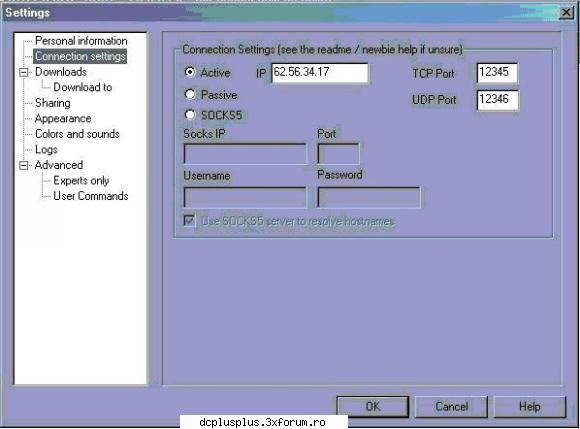
To find your external IP address (which is the one requested by DC++ settings) go to What is my IP which will tell you. Copy and paste it into the space. If you have assigned UDP and TCP ports, enter them into the boxes and go to the next step after configuration
Setting DC++ connection settings, share folders and slots
Active Mode
* Select the active mode radio button
* Enter external IP address into IP address box
* Enter TCP and UDP ports which you have assigned
Passive mode
* Select the passive mode radio button and you’re done!
Setting DC++ share folders and slots
Whilst in DC plus plus settings, you should also assign where your files are downloaded, uploaded and the number of slots to permit. (people who can share from you). DC++ promotes unselfish sharing - the best hubs with the most material require a large share size - generally at least 20GB. You will also need approximately 2 slots per hub to which you are connected. I generally connect to 5 at a time, so 10 slots are necessary
* Click on the settings icon again and go to ‘sharing’. You must share as many files as you can.
* Add the folder with all your files in.
* Below you will see a box called upload slots. Set this to 10. This will enable 10 people to upload from you simultaneously. A hub will not let u join unless you have at least 2 slots for uploads open. A good thing to remember is uploading does not affect your download speed, so don’t be stingy!
* Next, Go to ‘download to’. Either make a note of the folder where you would like your downloads to be placed or pick another.
Selecting a DC++ Hub
You need to connect to a decent hub to get access to the most popular or niche downloads. Some hubs will specialize in different types of data, whilst others will be popular - hence have a wide range of people to share from. Also, some hubs will have a minimum share size.
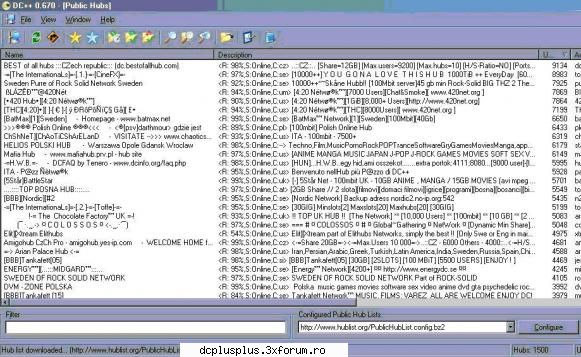
Click the icon in the toolbar with the computer with two pipes!
You will then come to a screen like this:
68.8KB
|
|
| pus acum 18 ani |
|
|
tiberiu
Administrator
Inregistrat: acum 19 ani
Postari: 108
|
|
Select a hub to connect to by double clicking on their name. You can refine the type of hub you want, such as ones with a 5Gb limit by typing it in filter and pressing enter. You can connect to as many hubs in DC++ as you have slots open, but remember, most hubs require 2 slots per hub minimum and some have a maximum number of slots - I would always go with 5 hubs and 10 slots.
Keeping track of your hubs.
You may connect to a dud hub - in which case you will get the message - target refused, or connection timeout. The hub may block your IP or you may not have enough sharesize. You may be sharing a file which it doesn’t like - all of which are shown on the tabs at the bottom - red if inactive, green if active. When searching for stuff, make sure your hubs are active.
Searching
This is like any normal search - refine your search by choosing a type of file. Directories will give you all files - such as an album. My best tip for this would be to only search with the check box ‘only for users with free slots’ ticked. When search results show thousands of results, but the user has 0 slots, you won’t be able to download. Checking this box makes sure you only get results from users you can actually download!
That’s it - happy sharing! Remember - Filesharing copywrited material is illegal - upload, share and download at your own risk. 27,000 people worldwide have so far been prosecuted - so you have been warned (ok so only 10 using Direct Connect!) but still, be careful.
|
|
| pus acum 18 ani |
|